
Email Layouts & Branding
Wrap every email your channels send in your own branding — logo, colors, or a fully custom HTML shell.
custom_email_branding capability, which caps an account at 10 layouts. Without it the /api/v1/email_layouts endpoints return 403 "Custom email branding is not enabled for this account". See pricing to enable it.What a layout is
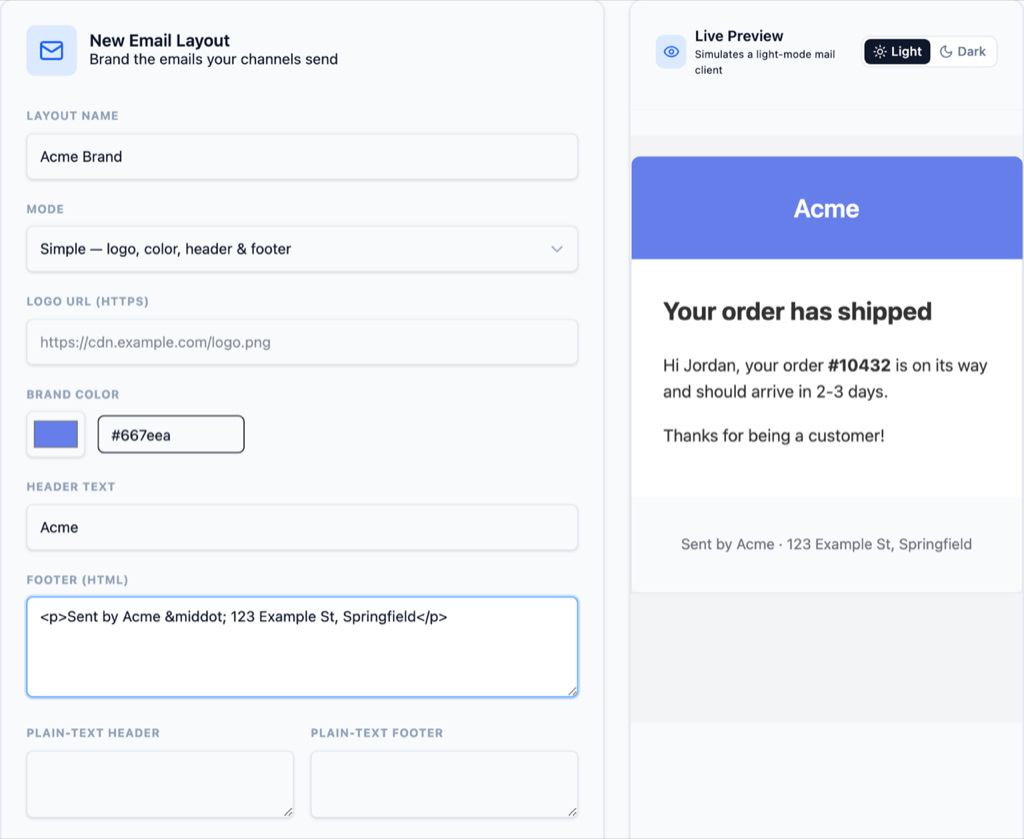
A layout is the branded shell around your message body: a header (logo and title on your brand color), the rendered message body in the middle, and a footer. Two modes cover the range: simple is structured branding — an https logo_url, a brand_color hex, header_text (defaults to your account name), and footer_html — rendered into RelayGrid's responsive default shell. Custom is your own full HTML layout, which must contain exactly one {{content}} slot for the message body.
Custom layouts are plain {{...}} substitution — no template language, no conditionals. Besides {{content}} you can use {{subject}}, {{account.name}}, {{brand.color}}, {{brand.header_text}}, {{brand.logo_html}} (a fully-formed <img>, or empty when no logo is set), {{brand.footer_html}}, {{date.today}}, and {{date.time}}. Every value is HTML-escaped on the way in except {{content}} and {{brand.footer_html}}, which carry markup that is already sanitized — so the message body lands in the email unescaped but safelisted.
{
  "email_layout": {
    "name": "Acme custom",
    "mode": "custom",
    "html": "<table width=\"100%\" cellpadding=\"0\" cellspacing=\"0\">
      <tr><td class=\"email-card\" style=\"padding:24px;\">{{content}}</td></tr>
      <tr><td class=\"email-footer\">{{brand.footer_html}}</td></tr>
    </table>",
    "text_footer": "Acme Inc · 1 Market St, San Francisco"
  }
}
How layout, channel, and template compose
The three pieces meet at render time, not when you save anything. A template renders its subject and body with the message's attributes; the email channel the send goes out over points at a layout; and the layout wraps the rendered body into the final HTML document — while text_header and text_footer decorate the plain-text part the same way. A channel with no layout sends the plain, unbranded document, and deleting a layout is a soft delete: channels that referenced it simply fall back to that default.
Iterate without saving
POST /api/v1/email_layouts/preview renders a posted layout — saved or not — against a sample body and returns { html, text }. It runs the exact pipeline delivery uses, so what you preview is what recipients get. Use it in a loop while you tune colors and markup, and save only when the preview looks right.
curl -X POST "https://relaygrid.dev/api/v1/email_layouts/preview" \
  -H "Authorization: Bearer YOUR_API_KEY" \
  -H "Content-Type: application/json" \
  -d '{
    "email_layout": {
      "mode": "simple",
      "brand_color": "#4f46e5",
      "logo_url": "https://example.com/logo.png",
      "header_text": "Acme",
      "footer_html": "<p>Acme Inc · 1 Market St, San Francisco</p>"
    },
    "sample_subject": "Your receipt",
    "sample_body": "<p>Thanks for your order!</p>"
}'{
"html": "<!DOCTYPE html><html ...>...<h1 ...>Acme</h1>...<p>Thanks for your order!</p>...</html>",
"text": "Thanks for your order!\n\nAcme"
}Sanitization and responsive-email caveats
Author-supplied HTML is sanitized on save and again at delivery against a safelist: common formatting and table tags, with href, src, style and presentational table attributes — layouts additionally keep <center>, bgcolor, and class. Never allowed: <script>, <style>, <iframe>, form controls, event handlers, and unsafe URLs. Styling is inline CSS only — the only mechanism that survives Gmail and Outlook — so a <style> block you paste in is stripped, not shipped.
The renderer wraps custom layouts in a trusted <head> that declares light/dark color-scheme support; opt your markup into the dark-mode palette with the email-body, email-card, and email-footer classes. Custom layout HTML is capped at 64 KB — comfortably under the point where Gmail starts clipping a message. For layout that survives every client, follow the default shell's lead: table-based structure, a max-width around 600px, and MSO conditional comments for Outlook.
{{content}} smuggled inside a tag that gets removed no longer counts — the save fails with a validation error. Keep the slot in plain text inside an allowed element.Next Steps
Send a branded message
Attach the layout to an email channel, then send through a template.
Send a Message